
Software Architecture · ART-SA-05
UAP Templates
Writing Architecture Descriptions with the Full, Core, and Lite Templates
A software architecture is valuable only when it is clearly communicated. Developers, reviewers, operators, and maintainers all learn the architecture from its documentation, and each of their activities suffers when the architecture description is incomplete, poorly organized, or silent on the reasons for its decisions, even when the design itself is sound. In practice, however, architecture descriptions are often written only after the design work is finished, and each project organizes them differently.
An earlier article in this series, ART-SA-04, introduced the Unified Architecture Process (UAP) [1] and noted that the methodology includes a standardized architecture description template aligned with its process. This article presents that template in detail: the role of templates in writing architecture descriptions, the three UAP templates and the criteria that distinguish them, an example system for each template, and the notation and procedure by which an AD is written. The three templates are as follows:
- Full. Complete process coverage, documented at task level.
- Core. Complete process coverage, documented at step level.
- Lite. Design-focused coverage, documented at step level, for projects that inherit an accepted requirements and context baseline.
1. Templates for Architecture Description
Architecture Description
An architecture description (AD) is a work product that expresses the architecture of a system: its fundamental structures, the design decisions that shape them, and the rationale for those decisions. ISO/IEC/IEEE 42010 [2] specifies what an AD must contain, including the stakeholders and their concerns, the viewpoints and views, the correspondences among views, and the decision rationale, but deliberately prescribes neither a document format nor a design process.
An AD serves several purposes over the life of a system:
- Communication. It gives stakeholders a common account of the structure and behavior of the system.
- Basis for Construction. It guides detailed design, implementation, integration, and deployment.
- Basis for Evaluation. It allows the architecture to be assessed against its requirements before implementation.
- Record of Decisions. It preserves the rationale on which later maintenance and evolution depend.
Challenges in Writing an Architecture Description
Writing a complete AD presents several recurring difficulties:
- Undefined Structure. Without a predefined structure, each team decides what to include and how to organize it, which makes ADs difficult to compare and review.
- Omitted Content. Architects may omit information they consider obvious, such as the system context or the reasons for rejecting an alternative, leaving readers unable to understand or assess the design.
- Reconstructed Rationale. When documentation is deferred, architects must reconstruct decision rationale from memory. Assumptions, alternatives, and trade-offs may be forgotten or inaccurately represented.
- Uneven Level of Detail. Without criteria for documentation depth, some sections become excessively detailed while others lack the information needed for implementation or review.
Role of AD Templates
An AD template is a predefined document structure that states what an AD contains and where each item belongs. A template addresses the difficulties above in the following ways:
- Consistency. A template gives ADs a uniform structure across projects and teams, which supports comparison and collaboration.
- Completeness. A template identifies the design information to be documented, and its structure serves as a checklist for detecting omissions.
- Traceability. A template provides entries that link design elements to requirements and decisions, supporting change impact analysis and verification of requirement coverage.
- Efficiency. Architects begin with a prepared structure and can devote their effort to describing and justifying the architecture.
- Reviewability. Reviewers find information in predictable places, so omissions, inconsistencies, and unsupported decisions are easier to identify.
2. Overview of UAP Templates
UAP templates provide standardized structures for documenting the architecture of systems designed with UAP. They extend the AD template presented in the book [1] into three variants suited to different project conditions.
Process-Aligned Structure
UAP organizes architecture design into activities, steps, and tasks. The templates map this hierarchy to the AD structure, as shown in Figure 1.
- Activity. Each activity corresponds to a chapter of the AD.
- Step. Each step corresponds to a section within the chapter.
- Task. Each task corresponds to a subsection within the section.
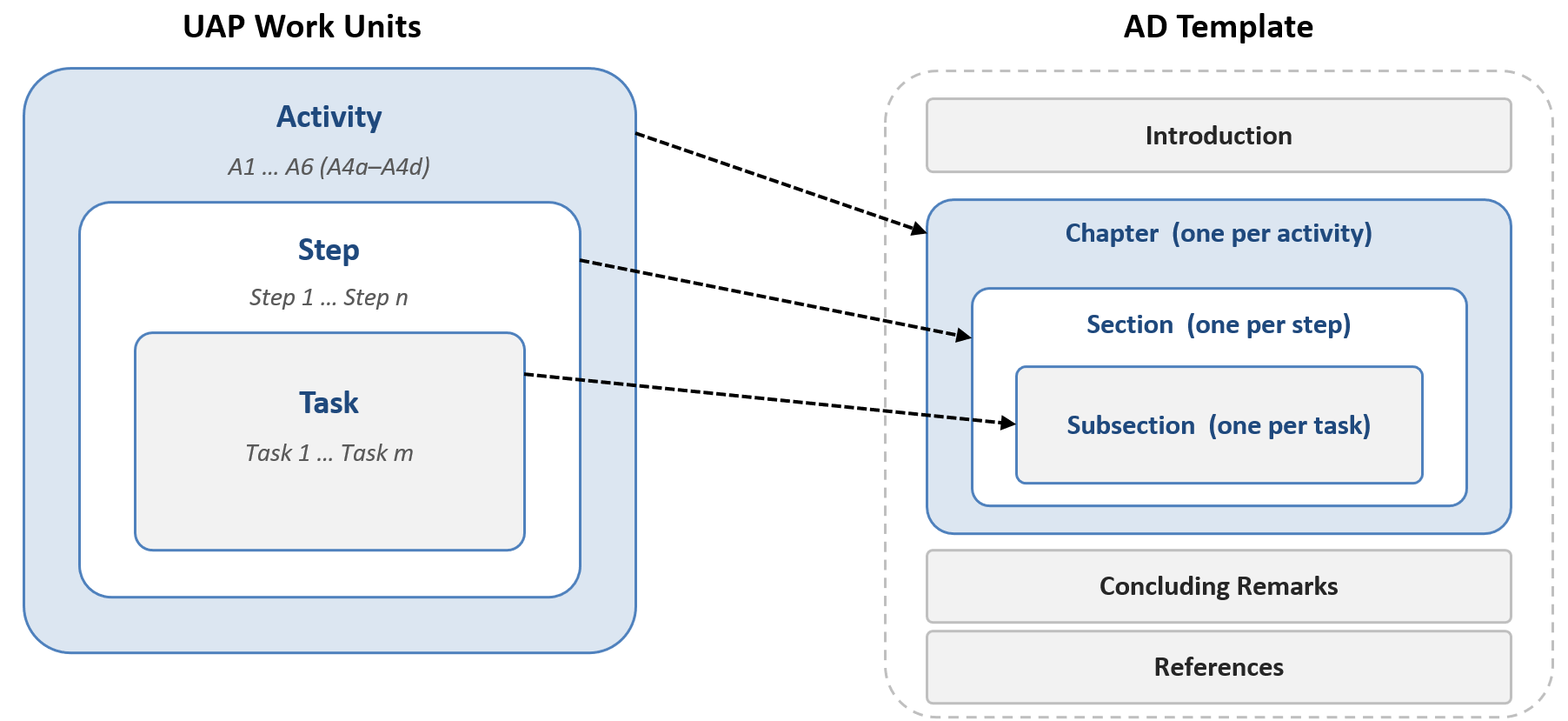
As shown in the figure, the AD template mirrors the hierarchy of UAP work units: each activity maps to a chapter, each step to a section, and each task to a subsection. The document therefore follows the order of the design work, and the output of any work unit can be located by its position. All UAP templates share a frame of Introduction, activity chapters, Concluding Remarks, and References, so the same mapping holds in every template, and each accommodates the content that ISO/IEC/IEEE 42010 [2] requires of an AD.
Three AD Templates: Full, Core, and Lite
UAP provides three AD templates: Full, Core, and Lite. Two variables distinguish them. The first, process coverage, is the set of UAP activities that a template documents. The second, documentation granularity, is the level at which results are recorded, either task or step. The Full template is the master template, and the Core and Lite templates are derived from it. As a result, all three use the same terminology and keep their shared chapters in the same order.
- Full template. Covers every UAP activity and records results at task level, so it captures everything the process produces.
- Core template. Covers every UAP activity and records results at step level. Its step-level record is retained in the other two templates for the activities they document.
- Lite template. Documents Activities A3 to A5 at step level, includes A6 when required, and covers A1 and A2 by reference to an accepted requirements and context baseline. It is the lightest form that still documents the design completely.
Table 1 summarizes the criteria that distinguish the three templates.
Table 1. Distinguishing Criteria of the UAP Templates
| Criteria | Full | Core | Lite |
|---|---|---|---|
| Process coverage | A1 to A6 | A1 to A6 | A3 to A5; A1 and A2 by reference; A6 conditional |
| Documentation granularity | Task Level | Step Level | Step Level |
| Recorded content | Per task: artifact, decisions and rationale, requirements addressed; per step: step-level record | Per step: consolidated result, decisions and rationale, requirements addressed | Baseline reference and requirement delta; per step: same record as Core |
| Architecture evaluation | Required, full scope | Required, full scope | Limited to added or changed elements, or waived with justification |
| Traceability | Requirement → task output → design element | Requirement → step output → design element | Baseline or delta requirement → step output → design element |
| Requirement baseline | Established within the project | Established within the project | Inherited and accepted; changed only by a bounded delta |
| Assurance need | Decision derivation evidenced to an external party | Formal architecture review; process not audited | Team-internal or delta-focused review |
As Table 1 shows, the Full template records and traces the output of every task, whereas the Core and Lite templates record and trace the output of every step. Only the Lite template makes architecture evaluation conditional. Requirement baseline and assurance need indicate the project conditions under which each template applies, and thus guide the selection of a template.
The templates differ in size accordingly. The Full template contains nine activity chapters with 37 step sections and 96 task subsections. The Core template keeps the nine chapters and 37 step sections but omits the task subsections. The Lite template has seven activity chapters with 30 step sections, preceded by the four sections of the Requirements and Context Summary. The step level is therefore common to all three templates.
Selecting a Template
The two variables are each decided by one project condition, so selecting a template comes down to two questions:
- Assurance. Must the derivation of each design decision be demonstrable to a party outside the architecture team, such as a certification body, a regulator, or a contracting party? If so, the Full template applies.
- Baseline. Otherwise, does an accepted requirements and context baseline exist and remain valid for the project? If so, the Lite template applies; if not, the Core template applies.
A Lite template with task-level detail is intentionally not provided: a project that needs task-level evidence uses the Full template even when a baseline exists, because that evidence must be contained in the AD itself. The Lite template also corresponds to the tailoring of UAP described in ART-SA-04, in which A1 and A2 are not repeated and A6 is waived only under stated conditions.
Editions and Availability
Each template is provided in two editions with the same structure. The Guided edition states, for each entry, what the entry records and how its content is derived, and suits a first use of the template and instructional settings. The Clean edition contains only the structure, the placeholders, and the examples, and suits architects familiar with UAP and organizations that adopt a template as their standard. Once its guidance is removed, an AD begun on the Guided edition is identical to one written on the Clean edition.
The two editions of the three templates give six variants, such as Full-Guided and Core-Clean, all of which can be downloaded from the UAP Templates and Checklists page of the resource website: https://handsonse.org/full-ad-template/.
3. Full Template
The Full template documents the complete UAP process at task level. It includes every activity, step, and task, and records the result of each task as a separate entry. It therefore gives the most detailed account of both the architecture and the process by which the architecture was derived.
Scope and Organization
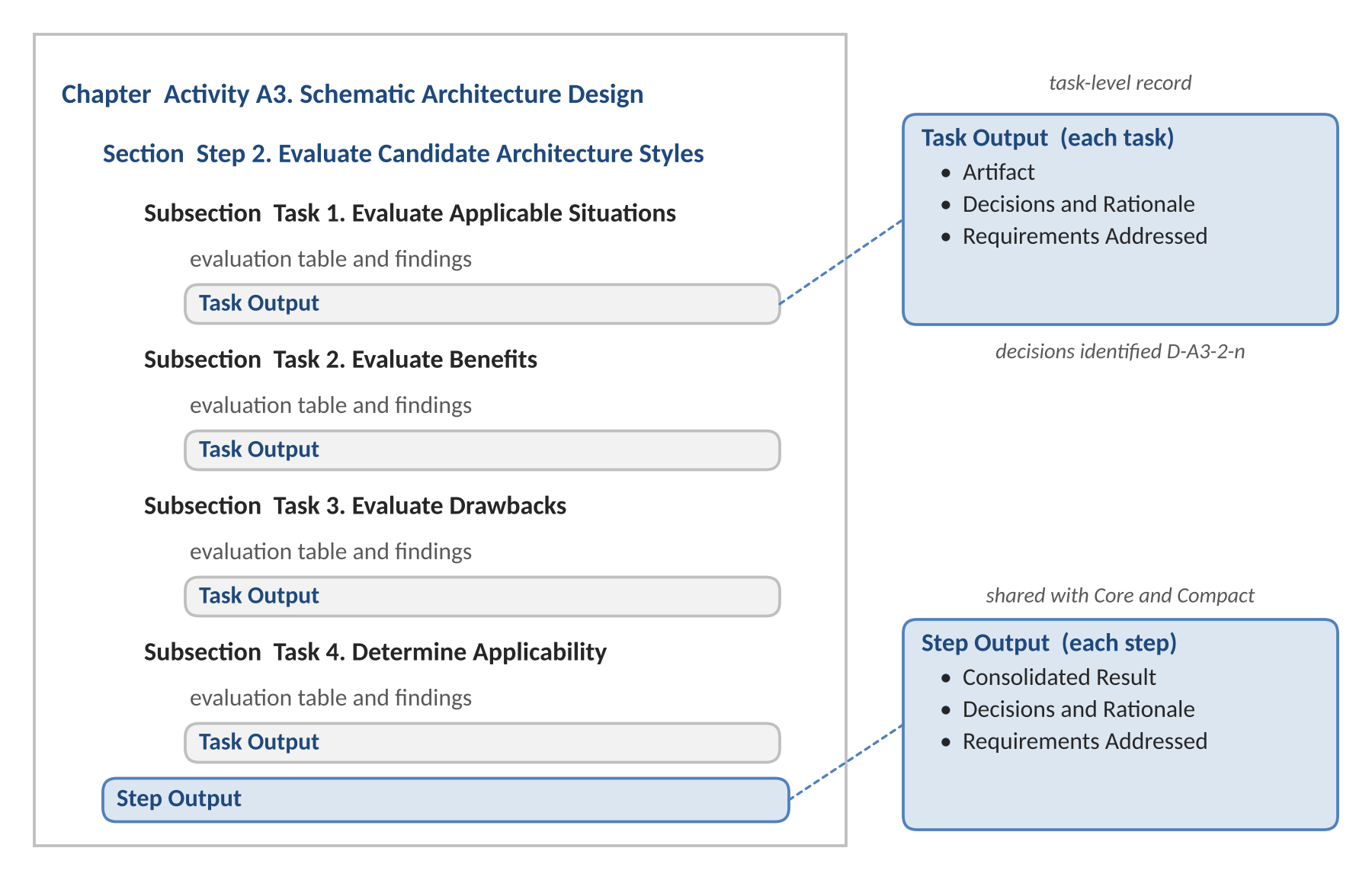
Coverage is complete: Activities A1 to A6 with all of their steps and tasks. The document uses three heading levels, level 1 for an activity, level 2 for a step, and level 3 for a task; the repeated blocks for candidate architecture styles in A3 and for non-functional requirements in A5 add one further level. Each task subsection closes with a Task Output entry, and each step section closes with a Step Output entry. Figure 2 shows this organization for one step of A3.
Recorded Content
The Task Output entry of each task records three items:
- Artifact. The model, table, or statement that the task produces, cited by its number in the subsection.
- Decisions and Rationale. The design decisions made in the task, each identified as D-<activity>-<step>-<n>, with their reasons and, where applicable, the alternatives considered.
- Requirements Addressed. The requirements of the refined SRS that the task addresses.
The Step Output entry of each step consolidates its result and decisions in the same form as in the Core and Lite templates, so an AD written with the Full template contains the Core description as a subset. Traceability runs from a requirement to the task output that addresses it, and from that output to the resulting design element.
Architecture Evaluation
Architecture Evaluation (A6) is required and covers the entire architecture. Each evaluation task records its target elements, method, and result in its Task Output entry, so that an external party can verify how the architecture was assessed. Deficiencies found are recorded as decisions with their rationale and traced to the design elements they revise.
Applicable Situations
The Full template applies when the derivation of design decisions must be demonstrable to a party outside the architecture team, such as an assessor, an auditor, or an instructor:
- Safety-Critical Systems. Systems subject to safety certification or independent safety assessment.
- Regulated Systems. Systems whose architecture is examined in a regulatory audit.
- Contractually Audited Systems. Projects in which the contracting party reviews the architecture process as well as its results.
- Instructional Use. Courses and training in which the application of each UAP task must be demonstrated and assessed.
The Full template is not suitable when no external party requires evidence of how decisions were derived. The documentation effort would then exceed the evidence needed, and the Core template applies, or the Lite template if an accepted baseline exists.
Example: Infusion Pump Control System
Consider the control software of a networked infusion pump used in hospitals. The software regulates the rate of drug delivery, monitors sensors for occlusion and air in the line, raises alarms, and exchanges prescriptions and infusion records with a hospital information system. Because a design fault can harm a patient, the product is subject to medical device regulation, including IEC 62304, and its architecture and rationale are examined by an external assessor.
The answer to the assurance question is therefore affirmative: for each safety-related decision, the manufacturer must show the motivating requirement, the alternatives considered, and the reason for the choice. In A5, for example, a requirement on the detection of delivery faults is documented through separate Task Output entries for the underlying facts and policies, the derived criteria, the candidate tactics, the cost-benefit analysis, and the selected tactics. The conformance map of Step 6 links each artifact to the one from which it was derived, so the assessor can follow the derivation from the AD alone. A6 is performed on the entire architecture at the same granularity.
4. Core Template
The Core template documents the complete UAP process at step level. It includes every activity and step but omits task-level entries; the results of the tasks within a step are consolidated in the entry for that step.
Scope and Organization
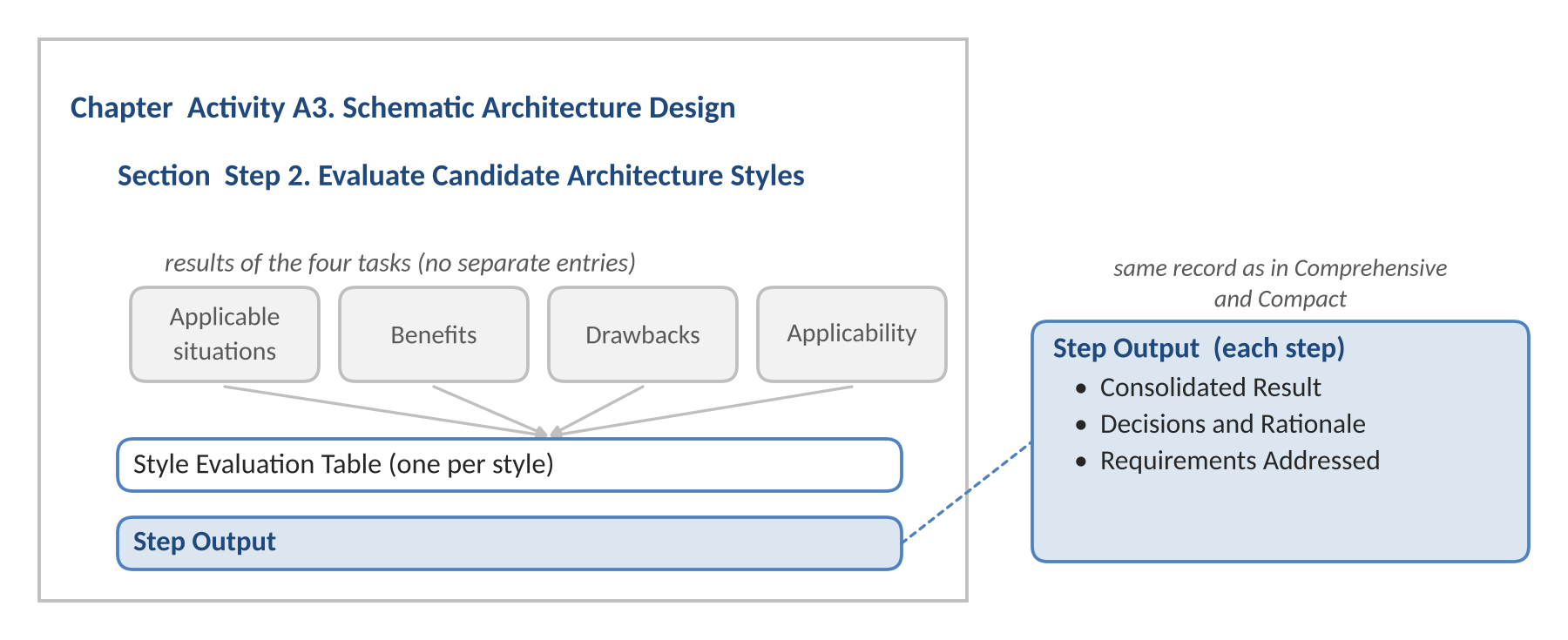
Coverage is complete: Activities A1 to A6 with all of their steps. The document uses two heading levels, level 1 for an activity and level 2 for a step, and the repeated blocks add one further level. Each step section closes with a Step Output entry. Figure 3 shows the step of Figure 2 as documented at step level.
Recorded Content
The Step Output entry of each step records three items:
- Consolidated Result. The final artifact of the step, such as the model, table, or diagram that the step delivers.
- Decisions and Rationale. The design decisions made in the step, each identified as D-<activity>-<step>-<n>, with their reasons.
- Requirements Addressed. The requirements of the refined SRS that the step addresses.
Traceability runs from a requirement to the step output that addresses it, and from that output to the resulting design element.
Architecture Evaluation
Architecture Evaluation (A6) is required and covers the entire architecture. The Step Output entry of each evaluation step records the target elements, methods, and results at the level of detail that a formal review requires, and deficiencies found are recorded as decisions and traced to the design elements they revise.
Applicable Situations
The Core template is the default template. It applies when the requirements and the system context must be established during the project, and the architecture is reviewed without an audit of the process:
- New Systems. Systems for which no accepted requirements and context baseline exists.
- Major Redevelopment. Redevelopment in which the system boundary, the stakeholder groups, or the architectural concerns change.
- Formally Reviewed Architectures. Projects in which the architecture is reviewed, but the derivation of each decision is not audited.
The Core template is not suitable in two situations:
- Task-Level Evidence Is Required. The Full template applies.
- An Accepted Baseline Exists and Remains Valid. The Lite template applies, since the Core template would repeat analysis that is already established.
Example: Car Rental Management System
Consider the Car Rental Management System (CRMS), the case study of the book [1] and the example used throughout the templates. The system serves a car rental company with rental centers at several locations: customers reserve and rent cars, rental center staff handle the rentals, and the company manages its car models, rental cars, and fees centrally. A Headquarters Server maintains the master repository and serves the client tiers, and the system interacts with a Driver License Validator and a Payment Authorizer. No earlier version of the system exists.
The requirements of the client contain deficiencies that must be resolved in A1. The SRS states, for example, that cars are relocated among rental centers as needed, but not whether staff or the system decides; refinement establishes that the system generates relocation orders autonomously. The system context, with several user groups and two external systems, must then be analyzed in A2. Complete coverage is therefore needed. The architecture is formally reviewed, but no external party audits how each task was performed, and no baseline exists, so the Core template applies.
In A3, for example, the Dispatcher style, a candidate for distributing peak-time requests to replicated Headquarters Servers, is evaluated in a single Style Evaluation Table that records its applicable situations, benefits, and drawbacks and the decision to adopt it. The Full template would instead use four task subsections, each closed by its own Task Output entry.
5. Lite Template
The Lite template documents architecture design for projects in which the results of Requirements Refinement (A1) and System Context Analysis (A2) already exist as an accepted baseline. It covers Schematic Architecture Design, the view-specific designs, and Design for Non-Functional Requirements at step level. In place of the first two activities, it provides a Requirements and Context Summary that references the baseline and records only what the project changes.
The template is defined by this precondition, not by the size of the system: a new version of a complex system qualifies when its baseline is established and the change to it is bounded.
Scope and Organization
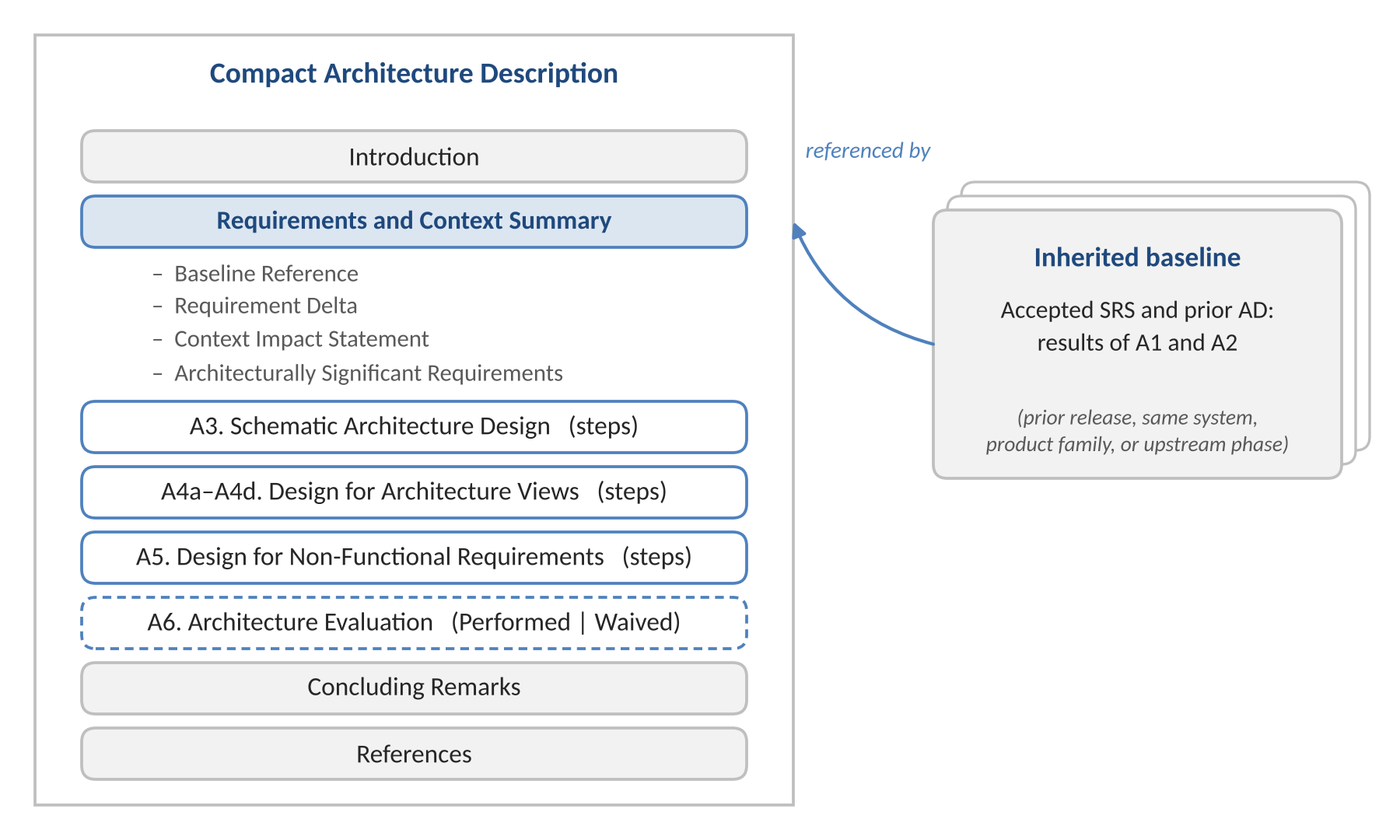
Coverage is design-focused: Activities A3 to A5 at step level, with A6 conditional; A1 and A2 are satisfied by reference to the baseline. The document uses the same two heading levels as the Core template and places the Requirements and Context Summary between the Introduction and the first activity chapter. Figure 4 shows the resulting organization.
Recorded Content
The Requirements and Context Summary takes the place of the A1 and A2 chapters and records four entries:
- Baseline Reference. The inherited documents and their versions.
- Requirement Delta. The new and changed functional and non-functional requirements.
- Context Impact Statement. A confirmation that the boundary, actors, persistent data, and behavior are unchanged, or a list of the minor changes.
- Architecturally Significant Requirements. The requirements carried into design, which anchor traceability for the remaining activities.
Each subsequent step closes with the same Step Output entry as in the Core template. Traceability runs from a baseline or delta requirement to the step output that addresses it, and from that output to the resulting design element.
Architecture Evaluation
The Architecture Evaluation chapter is always present; only its execution is conditional. The architect records one of two outcomes:
- Performed. Evaluation is limited to the elements added or changed by the project.
- Waived. A short statement records that evaluation was not performed and why.
Evaluation is required when any of the following holds; otherwise it may be waived:
- Structural Change. The schematic architecture changes, for example through a new or replaced architecture style.
- New Tactics. A new tactic affects existing quality attributes.
- High-Risk Decisions. A decision is novel, technically uncertain, or subject to safety or regulatory constraints.
Applicable Situations
The Lite template applies only when all three of the following conditions hold:
- Baseline Exists. The refined requirements and the context model are documented and accepted by the stakeholders.
- Baseline Remains Valid. The project does not alter the system boundary, the stakeholder groups, or the architectural concerns.
- Delta Is Bounded. New or changed requirements can be stated in the summary without renewed analysis.
These conditions typically hold in four situations, distinguished by where the baseline comes from:
- Prior Release. A new version of an existing system with added or enhanced features.
- Same System. Re-architecture, migration, or re-platforming in which functionality and context are unchanged.
- Product Family. A variant derived from a product line or a reference architecture.
- Upstream Phase. Requirements and context analysis completed and validated before architecture work began, for example by a systems engineering team or the contracting party.
The Lite template is not suitable in four situations:
- Context Changes. The new features add external systems, user types, or tiers. The Core template applies.
- Quality Requirements Change. The project introduces new or substantially changed non-functional requirements, such as a new regulation or a much larger scale target. The Core template applies.
- Baseline Is Undocumented. The earlier requirements and context were never documented. The Core template applies.
- Task-Level Evidence Is Required. The Full template applies, even when a baseline exists.
Example: Recurring Reservations for the Car Rental Management System
Consider a later release of the CRMS that adds recurring reservations, by which a member schedules a reservation that recurs weekly for a saved rental configuration. The SRS and AD of the earlier release were accepted by the client and the headquarters staff. The new feature extends reservation management, uses the existing Payment Authorizer, and introduces no new user type, external system, or tier. All three conditions hold and the review remains internal, so the Lite template applies.
The Requirements and Context Summary references the accepted SRS and AD as the baseline and states recurring reservations as the requirement delta (RD-01). The Context Impact Statement records one minor change, a Recurring Reservation class added as a specialization of Reservation, and the architecturally significant requirement ASR-01 requires that generating recurring reservations not degrade the response time of interactive reservations at peak hours. Design then begins at A3 and continues through A5 for the affected elements.
Because the generation of recurring reservations adds a timed closed-loop thread to the Headquarters Server, Architecture Evaluation is performed, limited to this thread and its impact on existing services. Had the release changed only the reservation user interface, the evaluation could have been waived with a stated reason; had it connected the system to a new external system, such as a partner booking service, the Core template would have applied.
6. Using the Templates
The three templates share one document frame, one notation, and one writing procedure, so an architect who has used one can use the others without further instruction. These conventions are explained in the Template Usage Notes chapter of the Guided edition and summarized in the Notes for Authors block of the Clean edition, both of which are deleted before release.
Document Frame
The activity chapters are enclosed in a frame that is the same in all three templates:
- Cover Page. The title and purpose of the system, an At a Glance summary of the architecture, and the document information, populated from document properties.
- Document Control. The revision history, the review and approval record, and the distribution list.
- Introduction. The purpose of the document, the system of interest, definitions, references, conventions, and the design process applied, including how UAP was tailored for the project.
- Activity Chapters. The chapters composed for each template, preceded in the Lite template by the Requirements and Context Summary.
- Closing Chapters and Appendices. Concluding Remarks and References, followed by appendices for the refined SRS, supplementary design models, detailed derivations, and the requirements traceability matrix.
Notation and Color Scheme
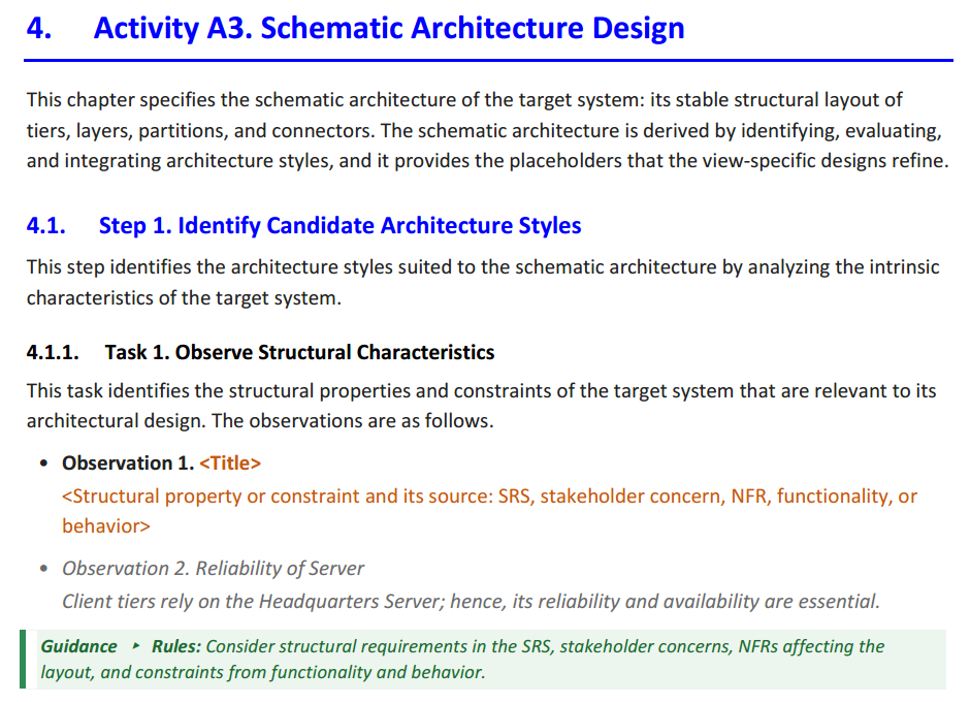
A template combines the structure and wording it supplies, the content the author supplies, and the instructions and examples that assist the author but are not part of the AD. A fixed scheme of four colors, applied identically in all templates and editions, distinguishes these kinds of text, as defined in Table 2.
Table 2. Color Scheme of the UAP Templates
| Color | Element | Meaning | Action by the Author |
|---|---|---|---|
| Blue | Chapter and section headings | The structure of the AD, corresponding to the activities and steps of UAP | Retain every heading; apply the heading styles to any heading added, since numbering is automatic |
| Orange, in angle brackets | Placeholders, such as <System Name> | Content to be supplied for the target system, implemented as content controls | Click the placeholder once and type the content |
| Green | Guidance blocks; in the Clean edition, conditional notes only | Instructions to the author on what an entry records and how it is derived; not part of the AD | Follow while writing, then remove all instances of the guidance style in one operation before release |
| Gray italic | Example text and table rows | Illustrations of the expected content and level of detail, drawn from the Car Rental Management System case study of the book | Overwrite with content for the target system, or delete |
| Black | Template-supplied wording | Standard sentences, table headings, and entry labels | Retain, adapt, or remove as the system requires |
The scheme makes the state of completion visible at a glance: an AD is complete when no orange placeholder, green guidance, or gray example remains. Figure 5 shows a page of the Full template in the Guided edition.
Writing Procedure
An AD is written on a template in the following sequence:
- Set Up the Document. Enter the system name, document identifier, and other attributes as document properties; the cover page, headers, footers, and table of contents are then populated automatically.
- Document in Process Order. Complete the chapters in the order of the activities, so that decisions and their rationale are recorded when they are made.
- Record Outputs. Close each step with its Step Output entry, and in the Full template each task with its Task Output entry. Identify each decision as D-<activity>-<step>-<n>, for example D-A3-2-1, so that it can be cited throughout the AD.
- Repeat Where Required. Copy the block for A3 Step 2 for each candidate architecture style, and the block for A5 for each non-functional requirement; each repeated block adds one heading level.
- Treat Conditional Entries. Conditional entries apply only when their condition holds. In the Full template, an inapplicable task keeps its heading, states the reason, and is listed under Tasks Not Applied in the Introduction; in the Core and Lite templates, the entry is omitted and the reason is stated in the Step Output.
- Present Each Artifact Once. Present each model once, in the last task or step that contributes to it, and place long derivation tables in Appendix C.
- Release. Complete the At a Glance box after Architecture Evaluation, remove the guidance, record the approvals, and set the status to Approved.
Versioning and Terms
The templates are issued as Word files named UAP-Template-<Variant>-<Edition>-v<x.y>.docx, for example UAP-Template-Core-Guided-v1.0.docx, and the cover of each AD names the template, edition, and version used. They are set in US Letter; A4 is obtained through page setup. The templates are copyrighted by PrimeAI Labs LLC and may be used, completed, and modified for any purpose, including commercial projects, without permission; attribution is required only when a template itself is redistributed, and the content written into a template belongs to its authors.
7. Conclusion
An architecture description determines how well an architecture can be communicated, reviewed, and maintained, and a template determines how reliably that description can be written. The UAP templates align the structure of the AD with the activities, steps, and tasks of the process, so that design results and their rationale are recorded as they are produced.
The three templates are defined by two variables, process coverage and documentation granularity. The Full template documents the complete process at task level for projects that must demonstrate the derivation of their decisions to an external party; the Core template documents it at step level and is the default when the requirements and the system context must be established during the project; and the Lite template documents the design activities at step level for projects that inherit an accepted baseline. Selecting a template thus reduces to two questions, one on assurance and one on the baseline.
Because the Core and Lite templates are derived from the Full template, an organization can apply all three with one terminology and one document structure, and an AD written with one template can serve as the baseline for a later release documented with another. A common color notation and writing procedure, offered in Guided and Clean editions, support both first-time and experienced authors.
The templates are available on the resource website at https://handsonse.org/full-ad-template/. Appendix B of the book [1] presents the architecture description template of UAP and guidelines for writing each of its chapters.
References
[1] S. D. Kim and M. Kim, Hands-on Software Architecture: Unified Architecture Process. Cham, Switzerland: Springer, 2025. ISBN 978-3-032-01183-1.
[2] ISO/IEC/IEEE, ISO/IEC/IEEE 42010:2022 – Software, systems and enterprise – Architecture description, 2nd ed., International Organization for Standardization, 2022.
[3] P. Clements, F. Bachmann, L. Bass, D. Garlan, J. Ivers, R. Little, P. Merson, R. Nord, and J. Stafford, Documenting Software Architectures: Views and Beyond, 2nd ed. Boston, MA, USA: Addison-Wesley, 2010.